About Maowl
Maowl is where software and data teams plan their table databases: on one canvas, together in real time, with an AI assistant whenever you want a head start.
Open Maowl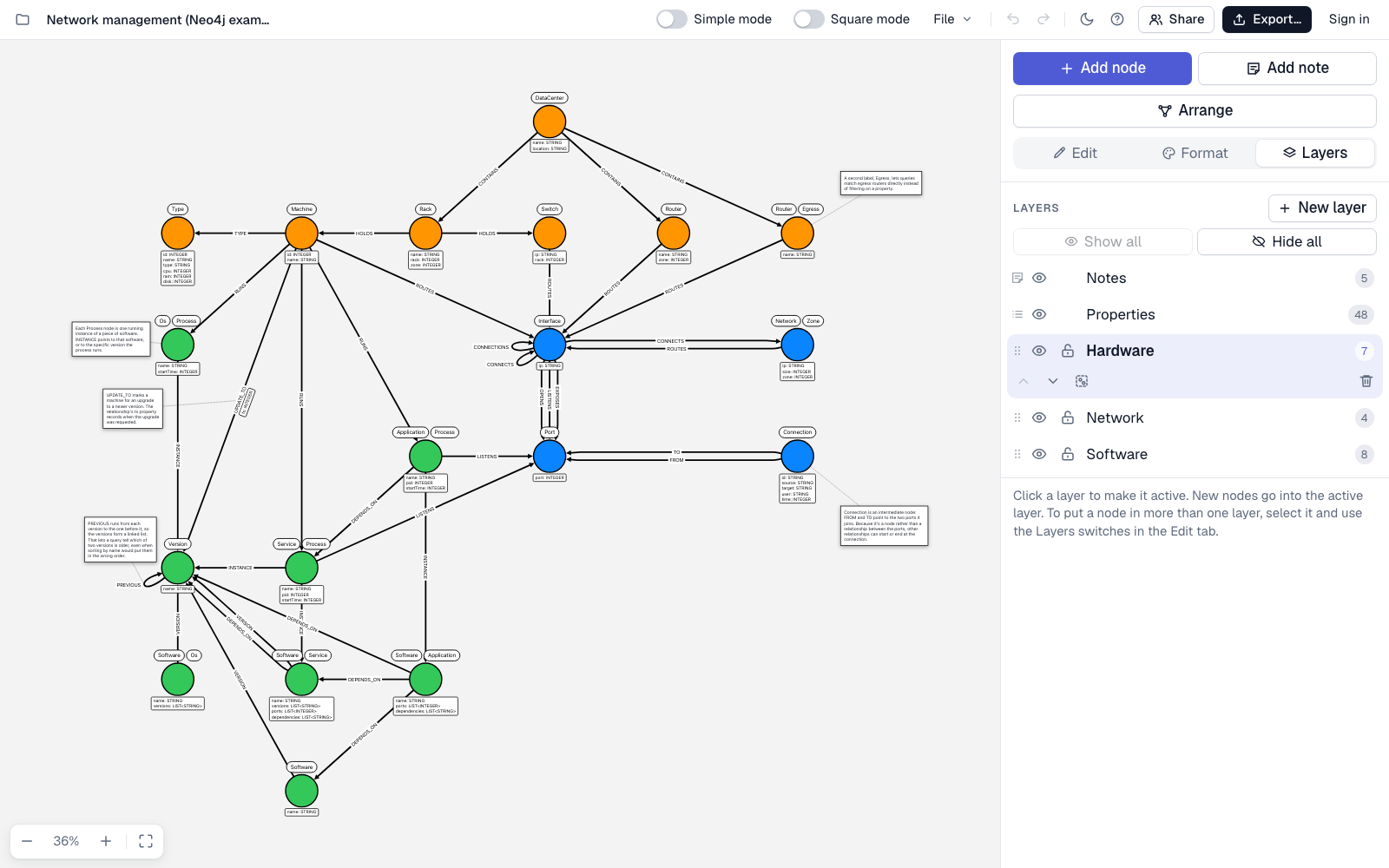
From first sketch to CREATE TABLE
-
Edit right on the canvas. Every table is a card that shows its columns, data types, and example values. Double-click a table or a foreign key to edit it in place. Mark the primary key, and columns that are Unique or Required. Already have the columns in a
CREATE TABLEstatement, a spreadsheet, or JSON? Paste them in one go. - Connect your tables. Drag from one table to another to add a foreign key. Several foreign keys between the same two tables sit side by side, and a table can point to itself, the way an employee points to their manager.
- Work in layers. Split a large database into layers you can show, hide, or lock, and focus on one part at a time. A table can belong to more than one layer. Hide the Columns layer to see just the tables and how they connect.
- Leave notes. Attach notes to tables and foreign keys to keep design decisions and open questions in view. Notes move with your tables, and they never end up in your SQL.
- Show it your way. Simple mode strips the model down to table names, captions, and foreign key names, ready for a presentation. Prefer circles to cards? Turn off Square mode.
- Tidy up in one click. Arrange untangles crossing foreign keys and spaces out your tables and notes so nothing overlaps.
-
Take it to your database. Export
CREATE TABLEstatements for PostgreSQL, MySQL, SQL Server, or SQLite, or download the model as JSON, SVG, or PNG. Export the whole model or just the layers you can see. - Bring in what you have. Open a schema file or paste your table definitions, and every table appears on the canvas. Paste a list of names from a spreadsheet, and each one becomes a table. Open an import as a new model, or merge it into the one you're working on.
- Work together in real time. Save a model online and invite teammates by email to edit or view it. You'll see each other's changes as they happen, and Version history lets you go back to any earlier version. Folders that only you can see keep your online models in order.
- Let AI draft it. Connect Claude, ChatGPT, or any other MCP client, then ask it to build a model in your account from a prompt, a document, or an existing schema. See how to connect.
- Using Neo4j too? Import the schema of a Neo4j database, or export a Cypher script with your constraints. See Import a Neo4j schema.
- Stored in the EU, private by default. Online models are encrypted in transit and at rest, and backed up automatically as you work. Only you and the people you invite by email can open them, plus your team's manager on a Team plan. There are no public links.
Plan with an AI assistant
Connect Claude, ChatGPT, or any other MCP client to your Maowl account with this address:
https://maowl.app/mcp- Claude (claude.ai, desktop, and mobile): go to Customize › Connectors › Add custom connector, paste the address, and click Connect.
- ChatGPT: in Settings › Apps, turn on developer mode, create an app with the address, and choose OAuth for authentication.
- Claude Code, Cursor, VS Code, and other MCP clients: add the address as a remote HTTP MCP server. In Claude Code, run the command below.
claude mcp add --transport http maowl https://maowl.app/mcpOr copy the prompt below into Claude Code, Codex, Cursor, Claude, or ChatGPT, and your assistant will connect itself. Account › AI assistants in the app has a version that names the online model you have open.
Connect to Maowl so we can plan and edit database tables together.

MCP server: https://maowl.app/mcp

1. If Maowl isn't connected yet, add the MCP server and sign in when prompted:
   - Claude Code: claude mcp add --transport http maowl https://maowl.app/mcp
   - Codex: codex mcp add maowl --url https://maowl.app/mcp
   - Cursor or VS Code: add https://maowl.app/mcp as a remote HTTP MCP server named "maowl"
   - Claude or ChatGPT: connect https://maowl.app/mcp as a custom MCP connector
2. Call list_models to see my online models, then ask what I'd like to draw or edit.
Once it's connected, ask your assistant to draft tables from a document or to update a model that's already in your account. If you have the model open, you'll see the changes appear on the canvas as your assistant works. Before every change, we save the model's previous version in Version history, so you can always go back. To see or disconnect your assistants, open Account in Maowl.
Explore a sample model
Open the Network management sample, a data center inventory, and look around. Notes beside the tables explain the design choices. Rather read first? Each sample has its own page that walks through the model and lists every table.
New to Maowl?
The guide has a short page for every feature, from drawing your first foreign key to planning a model with your team.
Frequently asked questions
What is Maowl?
Maowl is a visual canvas for planning table databases. You draw each table as a card with its columns, data types, and keys, connect the tables with foreign keys, and work out the design with your team in real time. When it's ready, you export CREATE TABLE statements for PostgreSQL, MySQL, SQL Server, or SQLite.
Which databases can Maowl export to?
PostgreSQL, MySQL, SQL Server, and SQLite. Every column keeps its data type, and the primary key columns become the PRIMARY KEY. Other Unique columns get UNIQUE, Required columns get NOT NULL, and every foreign key is included. You can also export JSON, SVG, or PNG, for the whole model or only the layers you can see.
Can Maowl draw the tables I already have?
Yes. Open or drop a .sql file, or paste CREATE TABLE statements into the Import dialog. The output of pg_dump --schema-only, mysqldump --no-data, SQL Server's Script as CREATE, and SQLite's .schema all work. Every table becomes a card with its columns, keys, and foreign keys. Maowl only reads the text: it never runs it, and it never connects to your database.
Can I start from a spreadsheet?
Yes. Copy a column of names from your spreadsheet and paste it on the canvas, and each name becomes a table. To fill in a table's columns, copy the rows that describe them, with or without a header row, and paste them into the table's column list.
Do I need to install anything?
No. Maowl runs in your browser at maowl.app. To save models to your account and work on them with your team, sign in with Google or with a code we email you.
Can multiple people work on the same model?
Yes. Save a model online and invite teammates by email to edit or view it. Everyone with the model open sees each other's changes, selections, and pointers as they happen. Maowl saves earlier versions automatically, and you can restore any of them from Version history.
Can an AI assistant draw a model in Maowl?
Yes. Connect Claude, ChatGPT, or any other MCP client to https://maowl.app/mcp, sign in, and allow access. Your assistant can then create and edit models in your account from a prompt, a document, or an existing schema. If you have the model open, you'll watch the changes appear. Before every change, we save the model's previous version in Version history, so you can always go back.
Does Maowl work with Neo4j too?
Yes, for teams that also use Neo4j. Import the schema of a Neo4j database by pasting the results of two read-only queries, or export your model as a Cypher script with its constraints.
Where are my models stored, and who can access them?
Models you haven't saved online stay in your browser on your device. Online models are stored within the EU, encrypted in transit and at rest, and backed up automatically as you work. Only you and the people you invite by email can open them, plus your team's manager on a Team plan. There are no public links. For the details, see our Privacy Policy and our security page.